 Wake Alarm
 Guide
Math alarm: how it works, and how to set one up
Updated November 7, 2026
A math alarm asks for a few sums before it counts as done. The point isn't the maths. It's that you can't add two numbers without being awake enough to read them, and by the third sum most people are.
Why a sum works better than a button
Pressing Stop takes no thought. Many people do it in the groggy minutes after waking, sometimes called sleep inertia, and don't remember it later. A sum needs you to look, read and think for a few seconds. That's usually enough to keep you from rolling over.
A good math alarm keeps the sums short. Long division at 6 a.m. makes people turn the app off for good. Two-digit addition is the sweet spot: easy when you're awake, hard to guess when you're not.
How Wake Alarm's Math task works
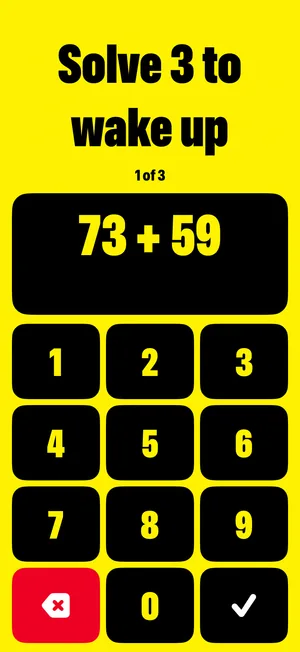
- You solve 3 sums, one after another. The screen shows which one you're on.
- Each sum adds two numbers from 12 to 89, and always needs a carry, so you have to think about it.
- Keys are big, for thumbs that aren't awake yet. There's a delete key and a check key.
- A wrong answer gives you a new sum, so guessing doesn't help.
- Finish the third sum and the rest of that morning's rings are cancelled.
Worked examples
Every sum needs a carry, meaning the ones add up to 10 or more. Here's the quick way to do them in your head:
- 47 + 38: 7 + 8 = 15, so write 5 and carry 1. Then 4 + 3 + 1 = 8. Answer: 85.
- 73 + 59: 3 + 9 = 12, write 2, carry 1. Then 7 + 5 + 1 = 13. Answer: 132.
- 66 + 25: or round it: 66 + 25 is 66 + 24 + 1, which is 90 + 1. Answer: 91.
If sums feel like too much first thing, the Shake task asks you to shake your iPhone 30 times instead. Both are free.
Set up a math alarm
- Open Wake Alarm and tap +.
- Pick the time and the days it repeats.
- Under Task, choose Math, then tap Save.
- Allow alarms when iOS asks. If you don't, the alarm list says in plain words that nothing will ring.
What if I just press Stop?
You can. When the alarm rings, your iPhone shows its own alarm screen, and its Stop button always works. Stop silences that ring. Until you finish the sums, the alarm rings again every 2 minutes, up to 5 more times, then ends by itself. You can also open the task straight from the alarm screen.
That's the honest version of a math alarm on iPhone: you can always end it, but it keeps coming back until you've done the sums.